1
You only need a wake-up
If an alarm is purely a 7 AM ring, the built-in Clock app already does the job. You probably do not need anything extra.
Clock app is fineBest alarm app for iPhone
Most alarm clock apps for iPhone just wake you up. Alarmate keeps you on time all day, turning meetings, deadlines, reminders, and future dates into real alarms that ring through Silent mode and Do Not Disturb until you act on them.
Free to start · No ads · No battery drain · iPhone, iPad, and Apple Watch
At a glance
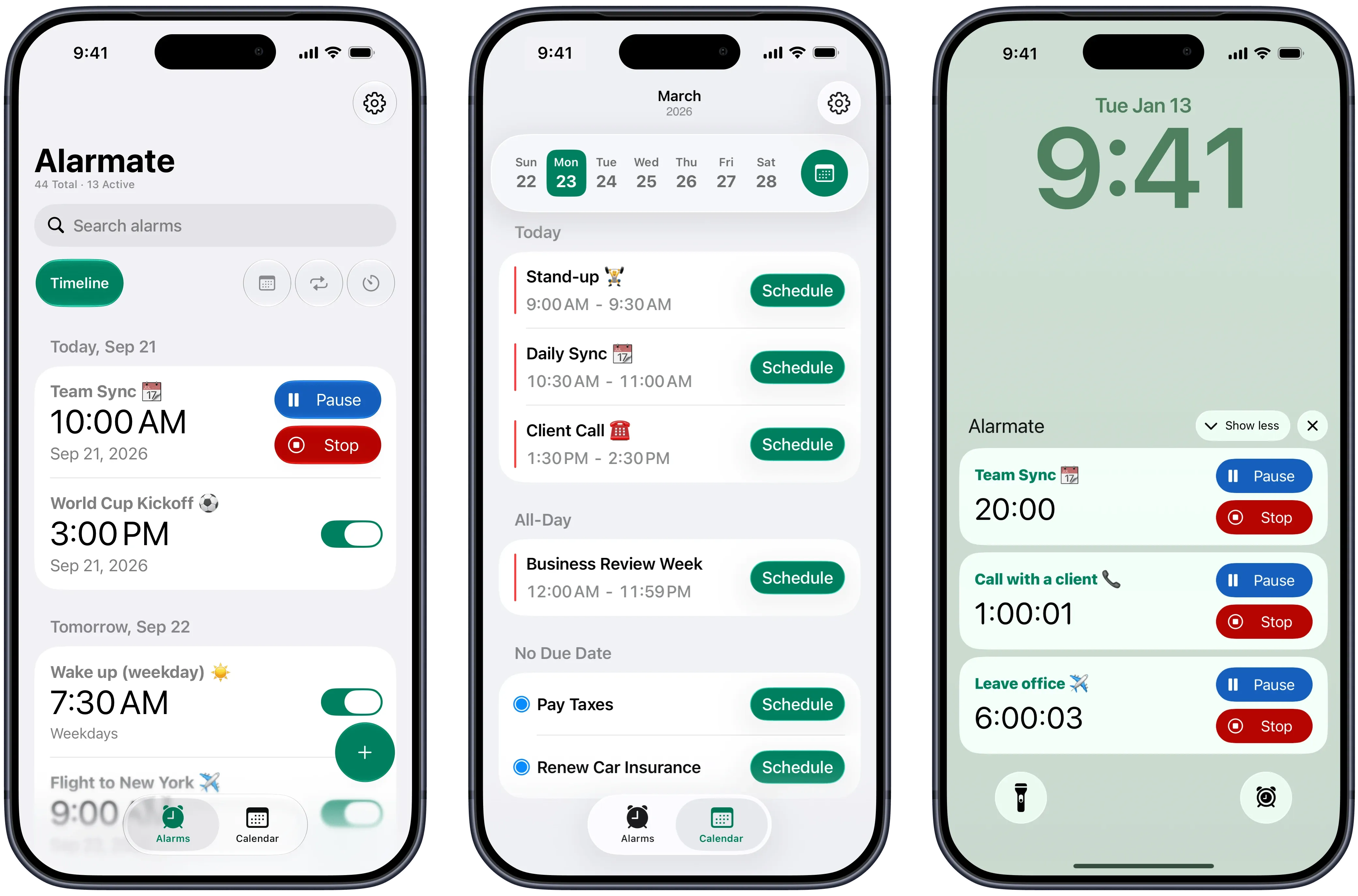
The best alarm app should do more than make noise in the morning. Alarmate is built for the important moments scattered through the rest of your day, so meetings, reminders, deadlines, and future dates can all become alarms you can trust.
The honest answer
There is no single answer that fits everyone, because "best" depends on what you actually set alarms for. The right alarm clock app for iPhone is the one that matches how demanding your day is.
For everyone past the wake-up stage, Alarmate is the best alarm app for staying on schedule all day. It runs on the same trusted iOS alarm system as the Clock app, then adds future dates, calendar and reminder alarms, live countdowns, and a single timeline for your whole day.
If an alarm is purely a 7 AM ring, the built-in Clock app already does the job. You probably do not need anything extra.
Clock app is fineOnce meetings, calls, and appointments fill your day, a wake-up clock is not enough. You need something that interrupts you on time.
You need moreIf flights, deadlines, refills, and renewals all live in your head, the best alarm app is one that turns them into real alarms.
Alarmate fits hereWhy it stands out
One idea sits underneath everything: a notification suggests, an alarm insists. Around that, Alarmate adds the workflow a busy day actually needs.
Silent, Focus, Do Not Disturb, Sleep, and Airplane mode are no match for it. Keep your phone calm and still trust the alarm that matters to cut through.
The Clock app stops a week out. Alarmate lets you drop a one-time alarm on next month, next quarter, or a date a full year away.
Pick an Apple Calendar event, choose a lead time, and the event title becomes the alarm name automatically.
Promote important Apple Reminders into real alarms. Bills, refills, follow-ups, and life admin get a signal you cannot swipe past.
Before an alarm fires, a live countdown can sit on your Lock Screen and Dynamic Island for up to 24 hours ahead.
Calendar alarms, date alarms, reminders, timers, and recurring alarms all share one chronological view with search and filters.
Alarms ring on Apple Watch and you can stop or snooze them there. They carry on through CarPlay too, with no extra setup.
Set any alarm to vibration only, or make it your default. It still keeps going until you respond, just without sound.
Your calendar and reminder data stay on your device. Alarmate runs quietly with no background battery drain and no ads.
Built to be trusted
An alarm app is only worth installing if you can stop double-checking it. Alarmate is built so important alarms keep working when your phone is quiet, offline, or tucked away.
iOS system
Runs on the same alarm engine your iPhone already trusts
5 modes
Rings through Silent, Focus, DND, Sleep, and Airplane
0%
Background battery drain
Offline
No internet or signal required
Alarmate uses the same system iOS relies on for the default Clock app, so an Alarmate alarm is as dependable as a morning wake-up.
Silent mode, Focus, Do Not Disturb, Sleep, and Airplane mode will not hold it back while your phone is on.
Your alarms are stored on the device, so they fire whether or not you have Wi-Fi or mobile data.
Alarmate sits in the background without draining your charge, built on the latest iOS alarm technology.
Easy for everyone
Setting an alarm should never make you stop and think. Alarmate keeps the interface calm and the controls within reach, whether you tap, glance, or speak.
Ask Siri to create a date alarm, recurring alarm, or timer without opening the app.
Set any alarm to vibrate only and wear your Apple Watch when sound is not practical.
Alarmate adapts to your system theme for comfortable viewing morning or night.
The path to a set alarm is short enough that you never have to figure out how it works.
Quick presets and focused creation flows keep common alarms fast to schedule.
Alarmate supports 15+ languages and native date and time formats.
Alarmate vs Clock
The default Clock app is built for waking up. Alarmate is built for staying on schedule all day.
iOS Clock app
Yes
Alarmate
Yes
iOS Clock app
Yes
Alarmate
Yes
iOS Clock app
No
Alarmate
Yes
iOS Clock app
No
Alarmate
Yes
iOS Clock app
No
Alarmate
Yes
iOS Clock app
No
Alarmate
Yes
iOS Clock app
No
Alarmate
Yes
iOS Clock app
No
Alarmate
Yes
iOS Clock app
No
Alarmate
Yes
iOS Clock app
No
Alarmate
Yes
iOS Clock app
No
Alarmate
Yes
iOS Clock app
No
Alarmate
Yes
iOS Clock app
Yes
Alarmate
Yes
iOS Clock app
Yes
Alarmate
Yes
| Feature | iOS Clock app | Alarmate |
|---|---|---|
| One-time alarms for today | Yes | Yes |
| Recurring alarms | Yes | Yes |
| Date-based alarms for future dates | No | Yes |
| Calendar events turned into alarms | No | Yes |
| Reminder-based alarms | No | Yes |
| Timers with a delayed start | No | Yes |
| Live countdown on Lock Screen | No | Yes |
| Dynamic Island countdown | No | Yes |
| Skip a recurring alarm without disabling it | No | Yes |
| Search across all your alarms | No | Yes |
| Single timeline of every alarm type | No | Yes |
| Filter alarms by type | No | Yes |
| Rings in Silent / Focus / Airplane mode | Yes | Yes |
| Battery-efficient, system-level alarms | Yes | Yes |
Alarmate works on the same trusted iOS alarm system as the Clock app. It simply adds the flexibility, visibility, and control that the default app was never designed for.
What it solves
Every example below maps to a real alarm type in the app, from work and health to travel and everyday life admin.
Work
Set a calendar alarm before a standup, client call, or review. It rings even if your phone is muted.
Work
Start a focus timer, then work without watching the clock until Alarmate surfaces you.
Health
Create a daily alarm that breaks through Silent mode, Focus, and the modes you already use.
Health
Create a date alarm for your next appointment and stop trying to hold it in your head.
Travel
Set a date alarm for the moment check-in opens and show a Lock Screen countdown before departure.
Travel
Schedule a timer to begin the morning of your trip, so packing starts before it gets urgent.
Life admin
Set an alarm before a trial converts and stop paying for subscriptions you meant to cancel.
Life admin
Turn the reminders that matter into real alarms and keep life admin from quietly piling up.
In their words
The same themes come up again and again: less checking, less stress, and more trust that the important thing will reach you.
"I kept checking my calendar all the time so I would not miss any meetings. I never imagined that using alarms could actually help me be more productive."
- App Store review
"I used to set multiple reminders just to be safe. Now I set one alarm and don't think about it until it goes off."
- Emmy_1991
"I had notifications for everything and still missed things. Alarmate was the first app that actually made me feel like I was in control."
- Fred_K_32
"I live by back-to-back meetings. The Live Activity countdown on my lock screen is something I did not know I needed until I tried it."
- Sarah L., product manager
"The countdown with future activation is genius. I set a two-hour packing countdown to auto-start the morning of my flight, and on the day it just started."
- David K., consultant
"I was often late to meetings because I ignored notifications. Alarmate keeps me on track, and I'm no longer the one who's always late."
- LucyF324
The bottom line
The reason Alarmate tends to win the "best alarm app for iPhone" question is not a single headline feature. It is that calendar events, future dates, reminders, timers, and recurring alarms finally live in one system you can trust.
Stop holding your schedule in your head. Set the alarm once, let the live countdown keep you aware, and put your attention back on the work in front of you.
Stop relying on notifications
Download Alarmate, connect your calendar and reminders, and stop wondering whether a passive notification will be enough.
No ads · No battery drain · Works in Do Not Disturb
FAQ
Alarmate turns calendar events, reminders, and future dates into real alarms that ring until you acknowledge them, even in Silent mode, Focus, and Do Not Disturb. It adds a Lock Screen countdown, a single timeline of every alarm, search, and filters, all things the default Clock app does not offer.
The default Clock app is mainly built for wake-up and recurring alarms. Alarmate goes further. You can set alarms for specific future dates, turn calendar events and reminders into alarms, see a live countdown on your Lock Screen and Dynamic Island, and view everything in one timeline with search and filters.
Yes. Alarmate alarms ring even when your iPhone is in Silent mode, Focus mode, Do Not Disturb, Sleep, or Airplane mode, as long as your phone is on.
Yes. Alarmate lets you set one-time alarms for specific future dates and times, weeks or months ahead. This fills the gap in the default Clock app, which caps one-time alarms at 7 days.
Yes. Alarmate is free to start, with no ads. The free plan keeps up to 3 active alarms at a time, and you can upgrade to Alarmate Pro later for unlimited active alarms.
Alarmate requires iOS 26 or later and works on iPhone and iPad, with full iPhone Duo support. Apple Watch support is available when alarms ring. No setup is needed on the watch.
Enter your email bellow to get started with Alarmate.