Up to 24 hours before your alarm
Start the countdown anywhere from a few minutes to 24 hours before your alarm fires. See your flight, meeting, or deadline ticking down all day.
Live Activities · Dynamic Island · Lock Screen
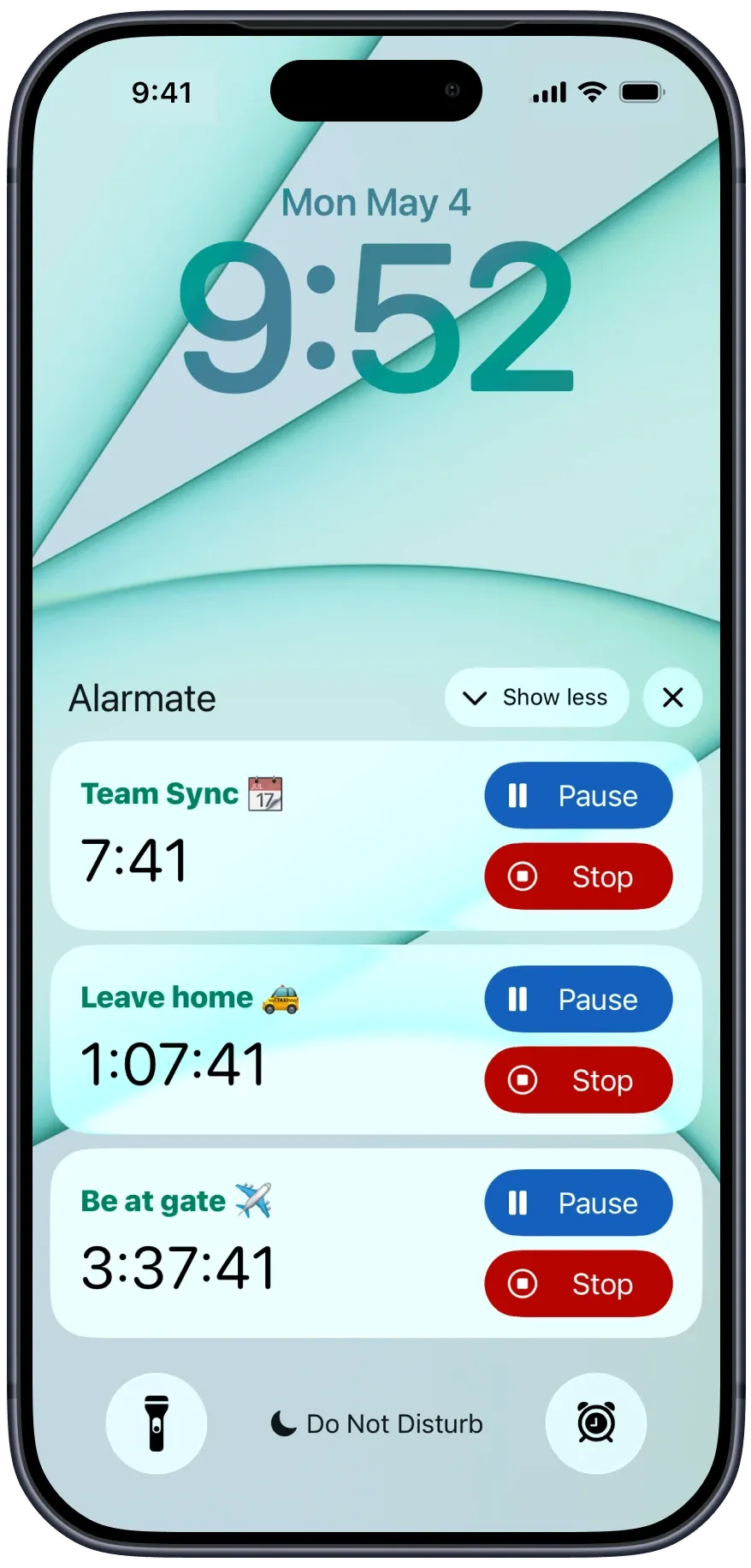
Alarmate puts a live countdown on your iPhone lock screen and Dynamic Island so you always know exactly how much time is left, without unlocking your phone. You can even set the alarm hands-free, just ask Siri, and the countdown shows up on your Lock Screen on its own.
Free to start · Siri & Siri AI Support · No ads. Ever
How it works
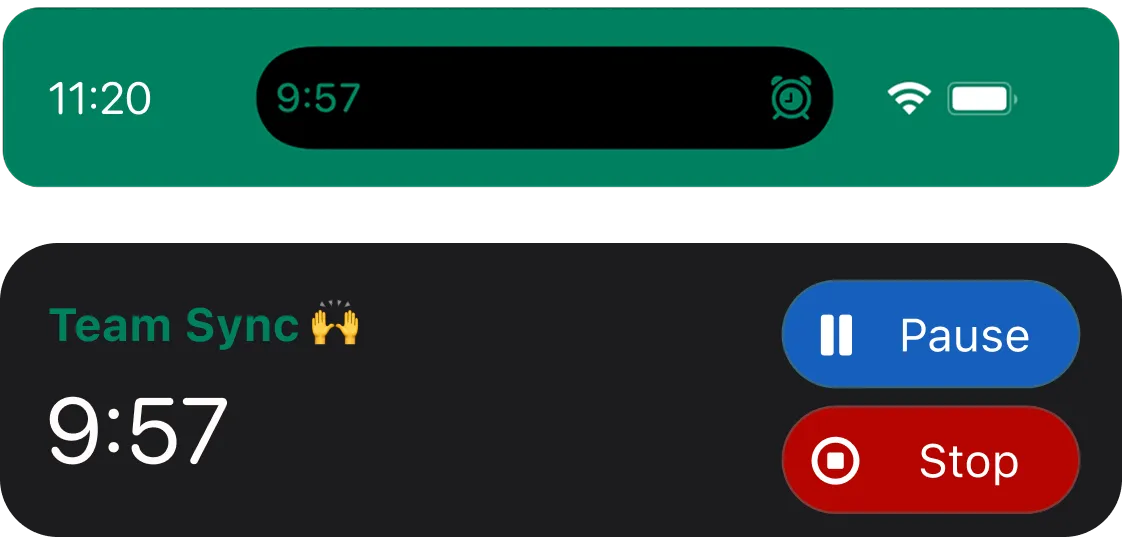
With Alarmate, it is easy. Your alarm can show a live countdown on your Lock Screen and, on supported iPhones, in the Dynamic Island too. The countdown updates in real time, so you can see exactly how much time is left at a glance, stay focused longer, and stop checking the time over and over again.
When it hits zero, your alarm fires. Simple.
Everything you can do
Start the countdown anywhere from a few minutes to 24 hours before your alarm fires. See your flight, meeting, or deadline ticking down all day.
Calendar alarms, date alarms, reminders, countdowns, recurring alarms - all of them get Live Activity support. Each type has its own configurable settings.
No need to open Alarmate. Pause a countdown mid-way and resume it later. Stop it entirely with one tap. Your wrist, your lock screen, your call.
Already up before your 7am alarm? Tap Stop on the Live Activity and skip it just for today. The recurring alarm comes back tomorrow, untouched.
Set a countdown that starts immediately - "remind me in 30 minutes" - or one that activates automatically at a future time. Perfect for travel prep or delayed routines.
On supported iPhones, the countdown lives in the Dynamic Island too - always visible at the top of your screen, even while using other apps.
How People Use Lock Screen Countdowns
For flights or appointments, I set a date-based alarm and make the Live Activity appear a few hours early. Seeing the countdown on my Lock Screen makes the whole thing feel much calmer.
Real use cases
The best thing about a lock screen countdown isn't the timer - it's what it replaces: the nagging feeling that you might be late. Glance at your screen, see the time left, know you're on track. That's it. No opening apps, no carrying your schedule in your head.
🤝 Work
Connect Alarmate to Apple Calendar, pick your meeting, and set the lead time. The countdown appears on your lock screen so you know exactly when to wrap up what you're doing without checking your calendar.
✈️ Travel
Set a date alarm for check-in time and configure the Live Activity to start 3 hours before. You'll see the countdown on your lock screen all morning with no need to remember to look it up.
🧠 Focus
Start a countdown and put your phone face-down. Glance at the lock screen anytime to see how much time is left in your focus block. Pause when something comes up and resume when you are back.
💧 Health
Set a 2-hour countdown. It rings, you drink, you start the next one. The lock screen countdown keeps you accountable between rings.
What users say
"I live by back-to-back meetings. The Live Activity countdown on my lock screen is something I did not know I needed until I tried it."
- Sarah L.
"The countdown with future activation is genius. I set a two-hour packing countdown to auto-start the morning of my flight."
- David K.
"I thought I only needed an alarm to wake up. Now I use Alarmate for meetings, deadlines, countdowns - it runs my whole day quietly in the background."
- Gemma.ewart
Download Alarmate and put a live countdown on your lock screen in under a minute.
Free to start · Siri & Siri AI Support · No ads. Ever
Frequently asked questions
Start using Alarmate 🙌 Every alarm you create in Alarmate will include a Lock Screen countdown by default. So you can see how much time is left before it rings without opening the app. When creating or editing an alarm, choose when the countdown should appear, for example, 30 minutes before the alarm, 2 hours before a meeting, or 24 hours before an important event.
It's an app that uses iOS Live Activities to show a real-time countdown timer directly on your iPhone lock screen. You can see exactly how much time is left until your alarm fires without unlocking your phone or opening the app.
You can configure each alarm to start its Live Activity countdown anywhere from a few minutes up to 24 hours before the alarm fires. So yes - a countdown for a flight tomorrow morning can start showing on your lock screen right now.
Yes. The Live Activity shows Pause and Stop buttons directly on your lock screen. You don't need to unlock your phone or open Alarmate. Tap Pause to freeze the countdown and resume it later, or tap Stop to cancel it entirely.
Only today's instance is cancelled - your recurring schedule stays completely intact. If your 7am alarm has already started its countdown and you're already up, you can stop it just for today without touching tomorrow's alarm.
Yes. On iPhones with the Dynamic Island, including iPhone 14 Pro and later models, Alarmate's Live Activity appears there too so the countdown is visible even while you're actively using other apps.
All of them. Calendar alarms, date alarms, reminder alarms, countdown alarms, and recurring alarms all support Live Activities. You can configure the countdown window separately for each alarm type in settings.
Yes. Alarmate alarms ring through Silent mode, Do Not Disturb, Focus mode, Sleep mode, and Airplane mode. The Live Activity stays visible too, and the countdown does not care what mode your phone is in.
Yes. Alarmate is free with up to 3 active alarms at a time, with no ads and no time limit. Alarmate Pro removes the limit and gives you unlimited active alarms. Live Activities work on the free plan.
Live Activities on the lock screen are an iPhone feature. Alarmate requires iOS 26 or later, and the Dynamic Island view requires a supported Dynamic Island iPhone model.
Enter your email bellow to get started with Alarmate.