1
Install Alarmate and connect your calendar
Download Alarmate and give it access to Apple Calendar. If you use Google, Outlook, or another work calendar, connect that account to Apple Calendar first so your events can appear in Alarmate.
For busy professionals and remote workers
Alarmate is a calendar reminder app for iPhone that turns selected calendar events into real alarms. Protect your focus, stay on time for meetings, and let Alarmate interrupt you when it matters.
Free to start · No ads · Works on iPhone, iPad, and Apple Watch
Built for focus
Calendar notifications are easy to miss. They appear quietly, disappear fast, and leave you checking your calendar again and again just to make sure you are not late.
Alarmate takes a different approach. It lets you turn important calendar events into real alarms, so you can stay focused on your work and trust that the right thing will interrupt you at the right time.
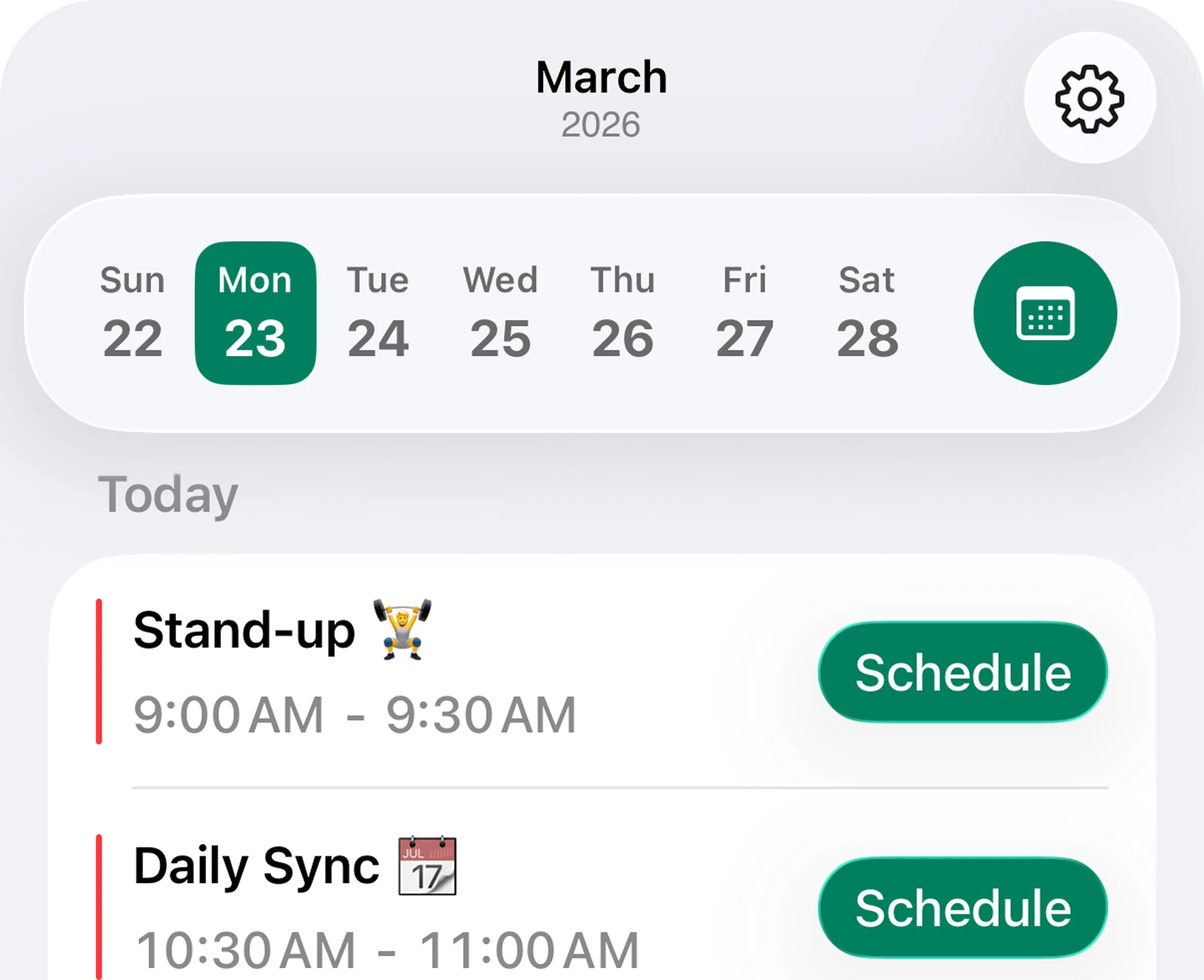
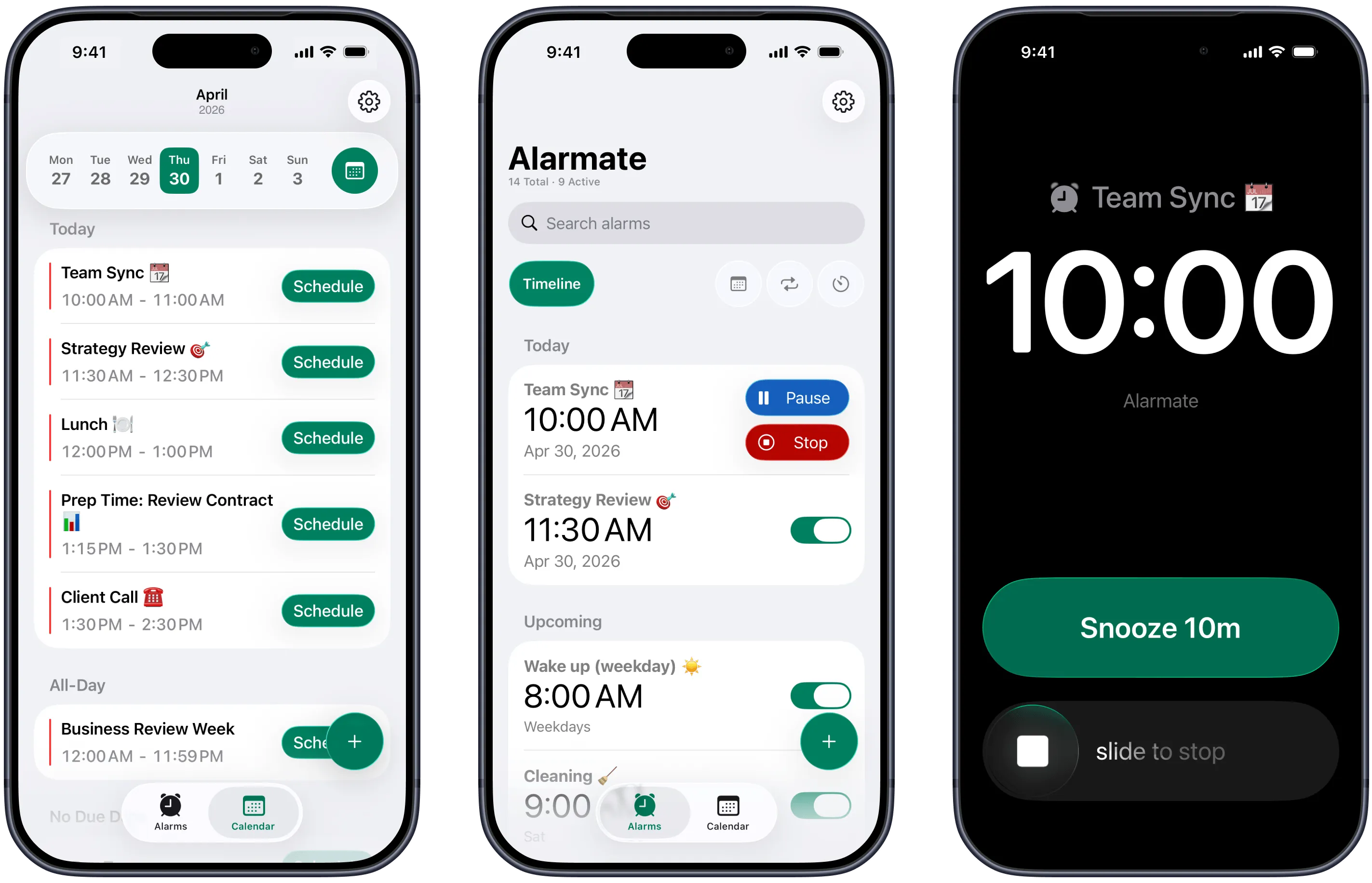
Open the Calendar tab, choose the event that matters, set how early you want the alarm to ring, and save it. Five minutes before a daily sync. Fifteen minutes before a client presentation. Ten minutes before you need to wrap up and switch context.
Why it helps
How People Use Calendar Alarms
I have a lot of meetings every day, so I set an alarm 5 minutes before each one. When it rings, I wrap up what I’m doing or prepare for the call. Then my 4-minute snooze gives me one final nudge right before the meeting starts.
How it works
1
Download Alarmate and give it access to Apple Calendar. If you use Google, Outlook, or another work calendar, connect that account to Apple Calendar first so your events can appear in Alarmate.
2
Open the Calendar tab, tap a meeting, choose when the alarm should fire - for example, 5 minutes before the meeting starts - and save it. Alarmate creates a calendar alarm using the event name, so you always know what the alarm is for.
3
Before the alarm fires, you can see a live countdown on your Lock Screen and in the Dynamic Island. Choose when it appears - 2 hours before a meeting, 30 minutes before, or any time that works for you. When the moment arrives, Alarmate rings just like your default iPhone alarm.
The focus problem
If your day is full of standups, client calls, review sessions, and deep work blocks, you already know the pattern.
You finally get into flow. Notifications are muted. Your attention is where it should be. Then a calendar reminder appears for a second, disappears, and leaves a question behind: was that enough, or should I check my calendar again?
That small uncertainty adds up fast.
You glance at the time between tasks. You reopen your calendar before important meetings. You keep part of your brain reserved for not being late. Even when nothing goes wrong, your focus is still paying for a reminder system you do not fully trust.
For busy professionals, that is the real problem with standard calendar notifications. They do not just fail sometimes. They make you manage time manually all day long.
Even when nothing technically goes wrong, your attention is still doing extra work to compensate for reminders you do not fully trust.
Calendar checking loops
You reopen your schedule just to make sure nothing important is slipping by.
Context switching before meetings
Part of your attention stays on the clock instead of on the work itself.
Low trust in important alerts
A passive banner is easy to miss, so you end up compensating for the system.
Live countdowns
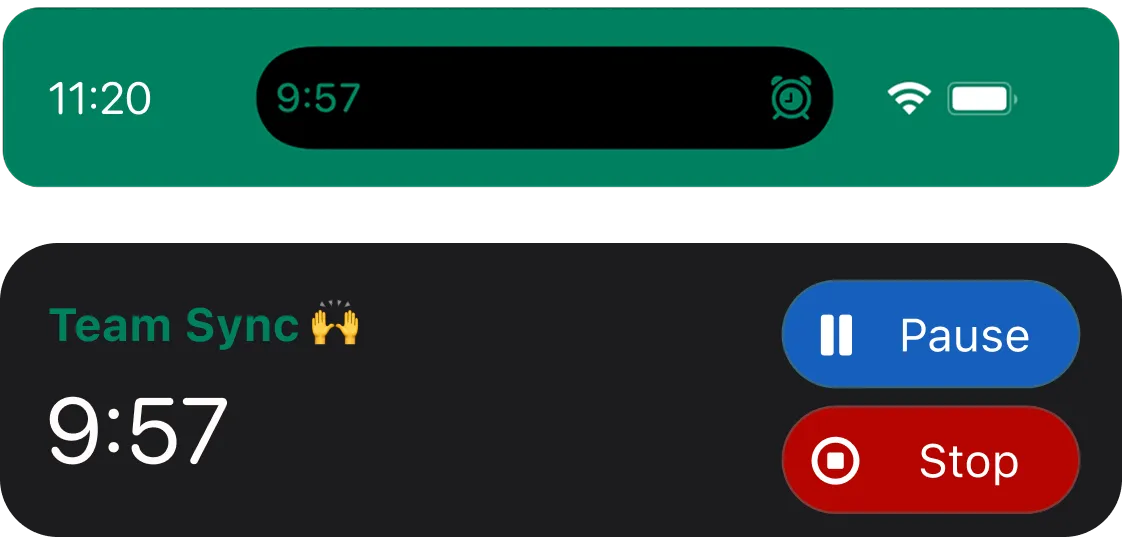
Before the alarm fires, you can track the countdown on your Lock Screen and in the Dynamic Island. That gives you awareness without turning your day into a cycle of checking and rechecking your calendar.
Why Alarmate works better than standard calendar reminders
Alarmate lets you turn selected calendar events into alarms that ring until you acknowledge them. It is a simple shift, but it solves the biggest weakness of a standard calendar alert: it is too easy to ignore.
When important events are protected by alarms, you stop babysitting your schedule. You do not need to keep reopening your calendar just to feel safe. You can stay in the task you are doing and let Alarmate handle the timing.
The moment you create a calendar alarm, Alarmate pulls in the event title for you. That keeps setup fast and makes every alarm immediately clear when it appears.
Alarmate works through Silent mode, Focus mode, Do Not Disturb, Sleep mode, and Airplane mode. You can keep distractions down without worrying that an important meeting will vanish behind the wrong setting.
Lock Screen Live Activities and Dynamic Island countdowns show how much time is left before your next alarm. You get a clear view of what is coming without breaking focus to check your calendar again.
Alarmate does more than calendar alarms. It also supports reminder alarms, future date alarms, timers, and recurring alarms. Everything lives in one timeline, so your day feels more organized and less fragmented.
Built for real workdays
Remote work is full of moments where passive reminders are not enough.
You are on a long call and need a cue to wrap up before the next one starts. You are deep in a task and do not want to keep checking the time. You have a client meeting you absolutely cannot join late, but you also do not want your phone buzzing with noise all day.
Alarmate fits that reality.
You choose the meetings that matter. You set alarms at the right lead time. You keep your phone quiet, your focus intact, and your day moving on time.
What that looks like
Daily sync
Set a 5-minute alarm so you can stay deep in work until it is actually time to switch.
Client presentation
Give yourself a 15-minute buffer to reset context and show up composed.
Back-to-back calls
Let the next meeting interrupt you instead of carrying the schedule in your head.
Alarmate vs Calendar notifications
Calendar notifications tell you something is scheduled. Alarmate makes sure important moments interrupt you at the right time. If your current system leaves you checking your calendar all day, the problem is not that you need more planning. It is that you need stronger protection around the moments that matter most.
Calendar notifications
Easy to miss when you are focused
Alarmate
Real alarms that demand acknowledgment
Calendar notifications
Designed like reminder banners
Alarmate
Built to break through when it matters
Calendar notifications
No live countdown to the event
Alarmate
Live countdown on the Lock Screen and Dynamic Island
Calendar notifications
No alarm workflow built around selected events
Alarmate
Choose the meetings that matter and turn them into alarms
Calendar notifications
Keeps you checking your schedule manually
Alarmate
Helps you trust the system and stay with your work
| Calendar notifications | Alarmate |
|---|---|
| Easy to miss when you are focused | Real alarms that demand acknowledgment |
| Designed like reminder banners | Built to break through when it matters |
| No live countdown to the event | Live countdown on the Lock Screen and Dynamic Island |
| No alarm workflow built around selected events | Choose the meetings that matter and turn them into alarms |
| Keeps you checking your schedule manually | Helps you trust the system and stay with your work |
What users say
The same themes show up again and again: less stress, less checking, better focus, and more confidence that nothing important will slip through.
"I kept checking my calendar all the time so I would not miss any meetings. It was stressful and made it hard to focus. I never imagined that using alarms could actually help me be more productive. Alarmate makes it so much easier."
- App Store review
"I used to ignore notifications and missed meetings a few times, which stressed me out. Since I started using Alarmate, I never miss an important event, and I can work without constantly checking my calendar."
- App Store review
"I have lots of meetings every day, and before Alarmate, I kept checking my calendar constantly. Now I spend just a minute setting alarms 5 minutes before each meeting and can focus on my work without worrying."
- App Store review
Beyond meetings
Once you start using Alarmate for calendar alarms, it often becomes the system you use for other time-sensitive moments too.
Turn Apple Reminders into real alarms. Set one-time alarms for future dates. Use timers for hard-stop work sessions. Keep recurring alarms for routines that need more reliability than a simple reminder.
That is what makes Alarmate useful long term. It is not just an alarm clock and not just a calendar app. It is one place to protect the moments you do not want to miss.
Everything in one timeline
Get started
Your calendar should not need constant babysitting. Turn the meetings that matter into real alarms, stay focused on the work in front of you, and let Alarmate handle the timing.
No ads · No battery drain · Works in Do Not Disturb
FAQ
No. You choose which events get alarms. That gives you control over what actually interrupts you and keeps the app useful on busy days.
Yes. When you turn a calendar event into an alarm, Alarmate automatically uses the event title as the alarm name. That makes setup faster and keeps every alarm clear when it appears.
Yes. Alarmate alarms work through all of those modes, so you can keep your phone quiet and still trust important alarms to break through.
Yes, through Apple Calendar. If your Google Calendar or Outlook account is connected to Apple Calendar on your iPhone, those events will appear in Alarmate and you can set alarms for them there. See the setup guide.
Yes. Alarmate uses calendar access only so it can show your events inside the app and help you turn selected ones into alarms. Your calendar data stays on your device and is used only inside the app to help you schedule alarms.
Yes. When an alarm goes off, you can stop or snooze it from Apple Watch. Vibration-only alarms are also supported with Apple Watch.
Yes. Alarmate also supports Apple Reminders, so selected reminders can become real alarms as well.
Yes. The free plan supports up to 3 active alarms at a time. Alarmate Pro removes the 3-alarm limit. There are no ads.
Alarmate works on iPhone and iPad, and it also works with Apple Watch. It requires iOS 26 or later.
Enter your email bellow to get started with Alarmate.