1
Call Siri and name the app
Hold the side button or say "Hey Siri," then start your request with Alarmate so Siri uses the right app.
"Hey Siri, set a date alarm in Alarmate"
Siri - Voice - iPhone
Alarmate is the alarm clock app with Siri and Siri AI support. Say the date and time, or a timeframe like "in 3 weeks," out loud, and Alarmate works out the date, then sets a real alarm. No mental math, and no 24-hour cap, set alarms weeks or months ahead.
Free to start - Siri AI & Shortcuts - Voice Alarms
How it works
Three steps, all done with voice. Say the date and time, like "July 26 at 9 AM." And if you need an alarm in 3 weeks, or 1 month before a certain date, or 30 minutes before a time, you don't need to do the math. Just say it, and Alarmate works out the exact day and time, then sets the alarm.
1
Hold the side button or say "Hey Siri," then start your request with Alarmate so Siri uses the right app.
"Hey Siri, set a date alarm in Alarmate"
2
Give an exact date if you have one, or just the timeframe. Alarmate works out the date for you, with no calendar counting.
"In 3 weeks at 4:30 PM"
3
Name the alarm so you know what it is for. Alarmate schedules it as a real, ringing alarm.
"Dentist follow-up"
The part we love most
Real plans arrive as relationships, not clock times. "Four weeks from now." "Two hours before my flight." Say it the way you think it, and Alarmate works out the exact date and time, then sets the alarm.
From voice to timeline
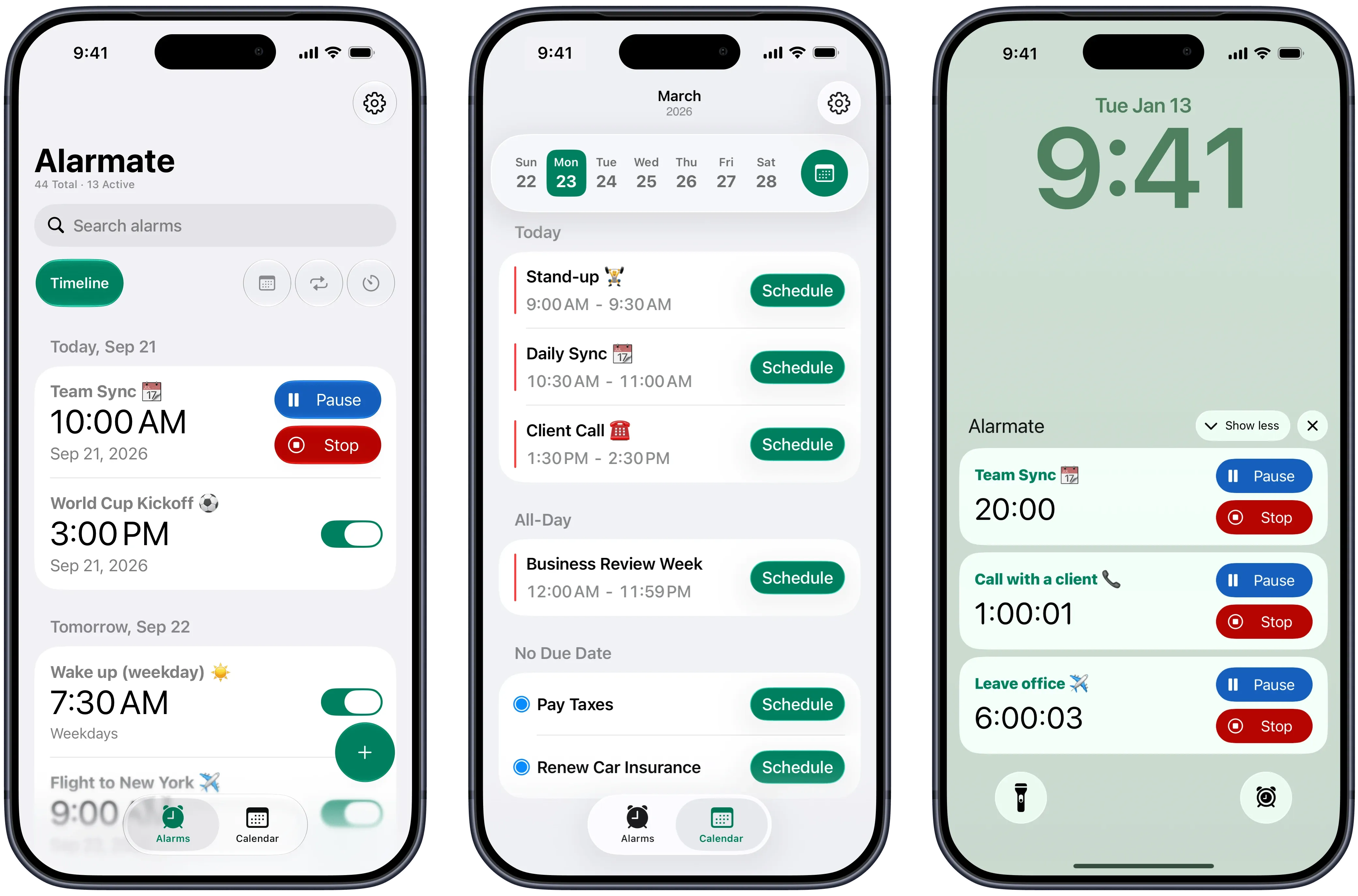
Voice is just the start. The alarm you set lands on the same Alarmate timeline as your other alarms and timers, so everything you have coming up sits in one place, ready to review or edit in seconds. And like any Alarmate alarm, it shows the time left on your Lock Screen, beginning at the moment you pick.
Everything you can do
The built-in Clock app can wake you tomorrow. Alarmate extends Siri to the alarms that run real life, all by voice.
Set an alarm for any date days, weeks, months, or years out. The default Clock app stops at short-range alarms. Alarmate keeps going.
Say "in 4 weeks" or "2 hours before 4:30 PM" and Alarmate works out the exact moment. No mental arithmetic.
Ask Alarmate to create a recurring alarm for standups, medication, school runs, or routines on the days you choose.
Start timers for focus blocks, naps, cooking, or short routines. Create one right now or schedule it to begin later.
Alarms ring through Silent mode, Focus, Do Not Disturb, Sleep, and Airplane mode. Set it and trust it.
Create date alarms, recurring alarms, and timers without opening the app or tapping through setup screens.
Why people switch
"I tend to ignore notifications when I am focused, so alarms work better for me. Now I just say it out loud and it is set."
- Alarmate user
When people actually use it
The best part of a voice alarm is not just speed. It is losing the nagging feeling that you will forget something or run late.
🩺 Appointments
Set an alarm a fixed time before an appointment and Alarmate works out when to head out the door.
"Hey Siri, set an alarm 40 minutes before my 9:20 appointment in Alarmate"
🤝 Work
Anchor an alarm a couple of hours before an offsite so you have a real heads-up to finish and travel.
"Hey Siri, set an alarm 2 hours before 4:30 PM in Alarmate"
✈️ Travel
Book the alarm the moment you book the trip. Say the timeframe and Alarmate sets the date alarm.
"Hey Siri, set an alarm in 3 weeks at 6 AM in Alarmate"
🧠 Focus
Start a focus timer by voice and put the phone down. No menus, no tapping.
"Hey Siri, start a focus timer in Alarmate"
What users say
"I used to be the person who was always late to meetings, not because I did not know, but because I ignored the notification. Alarmate keeps me on track."
- App Store review
"I had notifications for everything and still missed things. Alarmate was the first app that actually made me feel in control."
- Alarmate user
"I thought I only needed an alarm to wake up. Now I use Alarmate for meetings, deadlines, and countdowns. It runs my whole day quietly in the background."
- Gemma
Get started
Download the alarm clock with Siri support and set your first voice alarm in under a minute.
No ads · No battery drain · Free to start
Frequently asked questions
Yes. You can set alarms in Alarmate using Siri AI, including future date alarms, recurring alarms, and timers by voice.
Yes. You can still create date alarms, recurring alarms, and timers in Alarmate using Siri.
Alarmate. It gives Siri direct access to alarm creation, so you can make date alarms, recurring alarms, and timers by voice, including alarms for specific future dates that the built-in Clock app cannot set.
Yes, with Alarmate. Say "Hey Siri, set an alarm in 4 weeks in Alarmate," or "set an alarm 2 hours before 4:30 PM." Alarmate works out the exact date and time, then schedules it as a real alarm.
Yes. Even if the alarm is a few years away, Alarmate lets you create it with Siri. The only exception is a past date. If you try to set an alarm in the past, Alarmate saves it as inactive and lets you know, so you can quickly edit the date or time if needed.
Look for Siri to start its reply with "⏰ Alarmate." If Siri does not start with Alarmate, it may have grabbed the default Clock app instead. Try again with "Alarmate" at the front of the request.
No. Once Alarmate is connected to Siri, date alarm, recurring alarm, and timer phrases work straight from Siri, hands-free. Open the app only if you want to fine-tune sound, snooze, or the title later.
Yes. Alarmate uses the system-level alarm framework, so alarms ring through Silent mode, Do Not Disturb, Focus, Sleep, and Airplane mode.
Alarmate will save the alarm, but it will not schedule it as active. We will let you know, and you can open Alarmate to disable one of your active alarms if you want to activate the new one.
Yes. Up to 3 active alarms are free, with no ads and no time limit. Alarmate Pro removes the active alarm limit for unlimited alarms.
Enter your email bellow to get started with Alarmate.