New iOS alarm app? Don’t you already have Siri and the default alarm?
If that thought crossed your mind when you landed on our page, you’re not alone.
Let us tell you why we built Alarmate - and what problem it was created to solve.
How Alarmate Was Born
Alarmate started with a real problem experienced by one person: our co-founder, Valeria.
At the time, Valeria worked in marketing at a fast-growing IT company. Her days were packed with meetings - often 3 to 6 per day - across different teams and topics.
One hour she’d discuss paid ads strategy, the next she’d jump into a sales call, followed by a meeting with marketing operations to review reports.
If that sounds familiar, there’s a good chance Alarmate can simplify your life too.
The Problem: Calendar Anxiety
One day, Valeria noticed something troubling:
She was checking her calendar constantly - not because she wanted to, but because she was afraid of being late to a meeting.
Most meetings weren’t recurring. Remembering all of them felt impossible.
She’d start working on a task, then suddenly pause with a thought:
“Wait… do I have a meeting soon?”
She’d open the calendar, review upcoming events, return to work - only to repeat the same process again shortly after.
On some days, her Focus mode was so intense that even with multiple calendar checks, she still was late for meetings.
Colleagues would message her asking if she was joining.
It was stressful.
And honestly - embarrassing 🫠.
After several situations like this, Valeria realized something important: Calendar notifications didn’t work for her.
Like many professionals, she used many tools and chats every day and had learned to ignore notifications almost automatically.
Do you experience the same thing?
The Breakthrough: Alarms, Not Notifications
At some point, Valeria had a simple realization:
💡 Only a real alarm can interrupt deep work and demand attention.
A loud sound or persistent vibration was the only thing she couldn’t ignore.
So she started an experiment:
She set alarms 5 minutes before every meeting.
The result?
After just one week:
-
She was on time for every meeting ✅
-
She had 5 minutes to prepare and mentally switch contexts ✅
-
She even got short breaks between calls ✅
Alarms also helped her end meetings on time.
Before, back-to-back meetings often caused delays. Now she had clear “hard stops.”
After two weeks, something unexpected happened:
-
Her anxiety dropped
-
She stopped checking her calendar constantly
-
She could focus for longer stretches of time
She trusted the alarms to interrupt her when it mattered.
She simply couldn’t miss them.
Soon, setting alarms became part of her daily routine.
A New Way to Think About Alarms
Once Valeria stopped seeing alarms as just a wake-up tool, new use cases appeared:
-
Reminders for friends’ birthdays
-
Timers to take breaks or drink water
-
Timers for medication
-
Travel alarms with flight numbers and departure times
Even though she traveled frequently for work, she felt calmer when she could quickly see, right on her phone, how much time was left until her flight and when she needed to leave her home or hotel.
That’s when she realized:
Alarms could be a powerful time-management tool.
Why the Default Alarm App Wasn’t Enough
As useful as alarms were, the default iOS alarm app had limitations:
-
No connection to the calendar
-
Constant app-switching between Calendar and Alarms
-
Manual alarm naming for every meeting
-
A cluttered list of active and inactive alarms
-
No easy way to see what mattered today
She wanted something better.
From Idea to Product
Around that time, our second co-founder, Max, showed Valeria a prototype he’d built for Apple Watch - a simple “one-tap alarm” that would ring 8 hours after launch, helping him sleep enough.
After hearing Valeria’s story, everything clicked.
They decided to join forces to build an alarm clock app that would solve their challenges and named it Alarmate.
Max led development, product, and design.
Valeria focused on product thinking and marketing.
What We Built
A few months later, we had a fully working prototype that checked all our boxes 🙌: deep Apple Calendar and Reminders integration, convenient search and filtering, Live Activities with custom fire times, date-based alarms, timers, and much more.
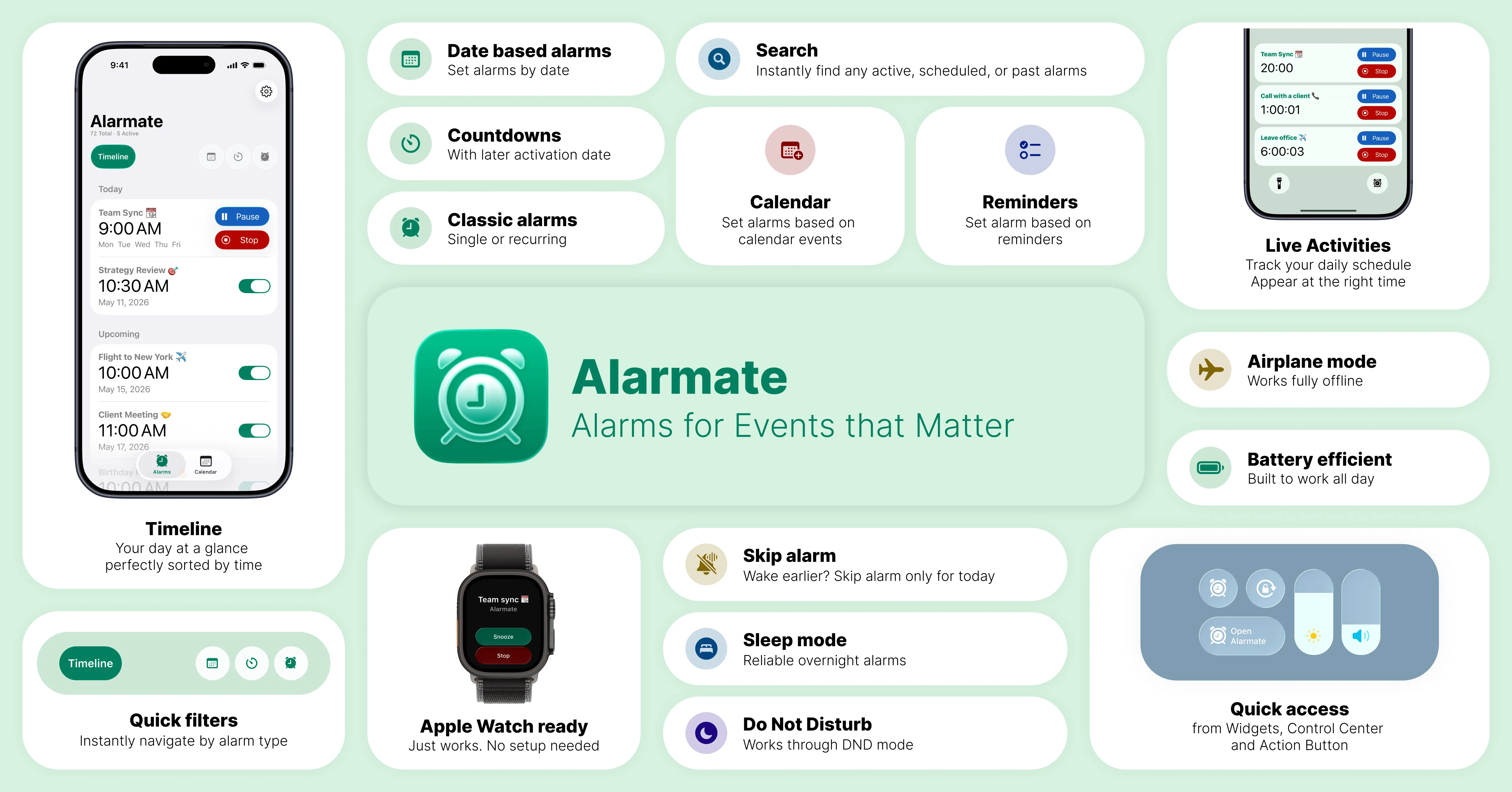
Alarmate: key features at a glance. View all features here ➔
Here are some use cases you won’t see in the default iOS app:
Calendar-based Alarms
-
View all calendar events in Alarmate. See every event from Apple Calendar directly in the app.
-
Set alarms for selected meetings. Focus only on the events that matter and skip optional meetings.
-
Alarms automatically inherit event titles. Know what’s next without opening your calendar.
-
Customizable Live Activities. Start seeing a Live Activity, e.g., 15 minutes before a meeting, so you always know how much time is left.
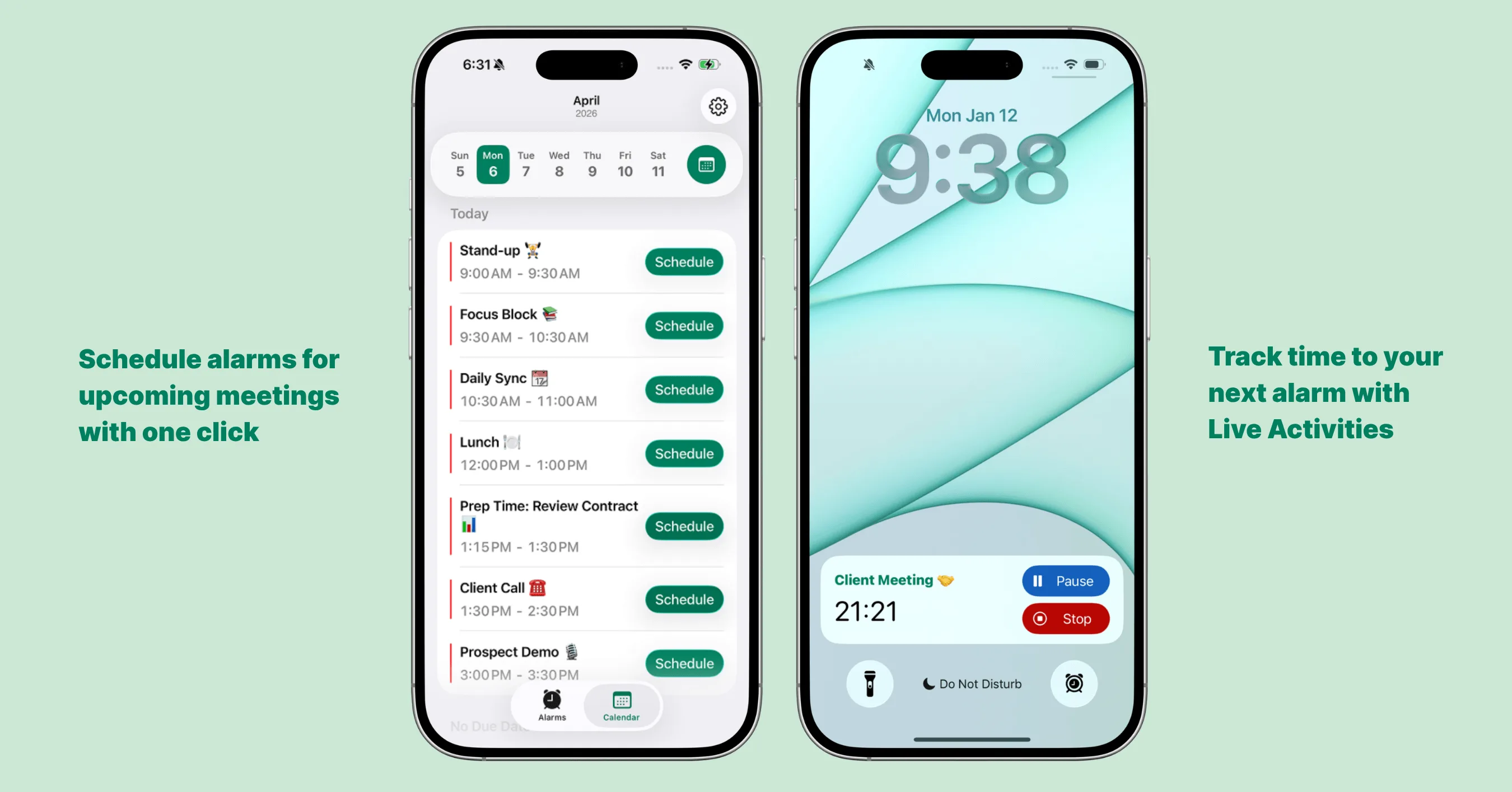
Setting alarms for future events in Alarmate
Live Activities with Custom Timing
-
Customize when Live Activities appear - minutes or hours in advance, depending on the event.
-
Pause recurring alarms before they ring - if you wake up earlier, you can pause the alarm via the Live Activity, while the recurring alarm for the next day stays active.
Perfect for travel - get reminders hours before departure, not just minutes.
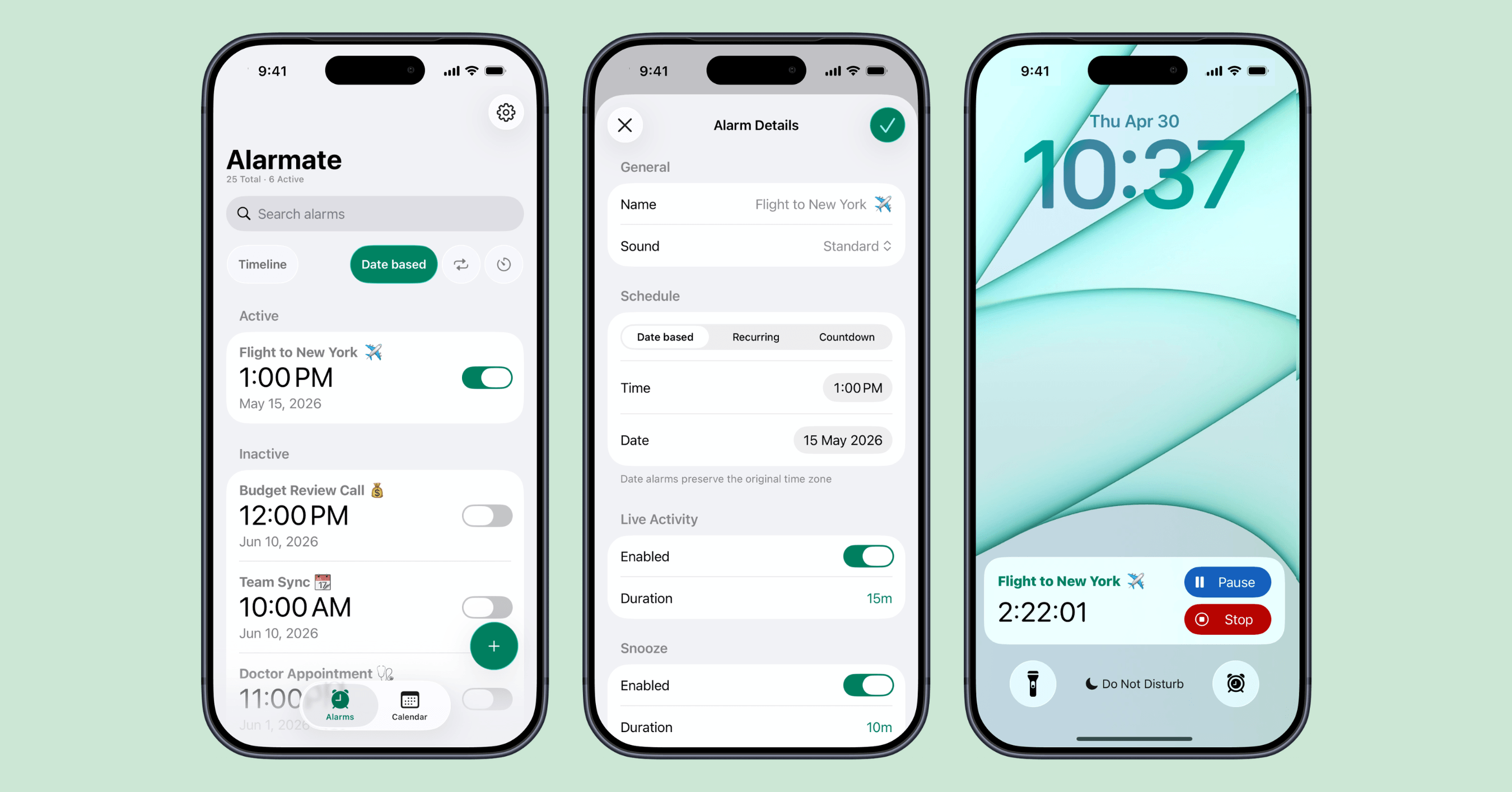
Customizing Live Activity to Start 3 Hours Before Your Flight
Date-Based Alarms
Set alarms for specific dates, not just recurring times.
Ideal for deadlines, special events, or one-off reminders.
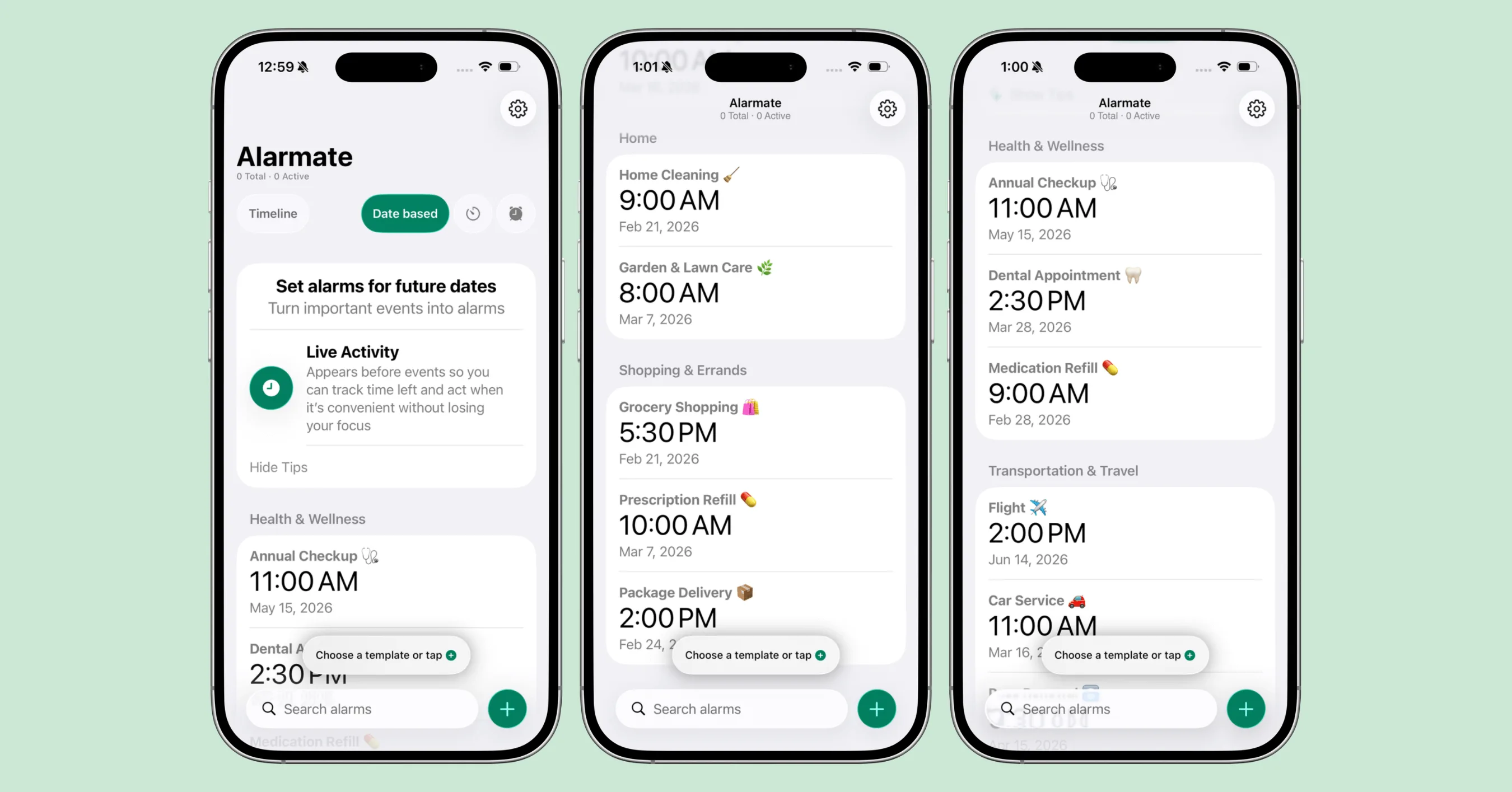
Alarmate: Date-Based Alarms
Alarms by Voice
You don’t even need to open the app. Say “Alarmate, set a date alarm” to Siri, give it a date or timeframe - even “in 3 weeks” or “end of next month” - and Alarmate works out the exact date and creates the alarm.
It works the same way for recurring alarms and timers. The same actions are also available in the Shortcuts app, so you can build alarm creation into your own routines and automations. For setup and phrase examples, here is the full Siri alarm guide.
Timers
Flexible timers up to 24 hours. Start them instantly or schedule a custom activation date and time. For example, set a timer to begin two hours before your train departs.
Use for Pomodoro sessions, hydration breaks, cooking timers, workouts, and anything else that needs a timer.
Alerts you when time is up - without affecting other alarms.
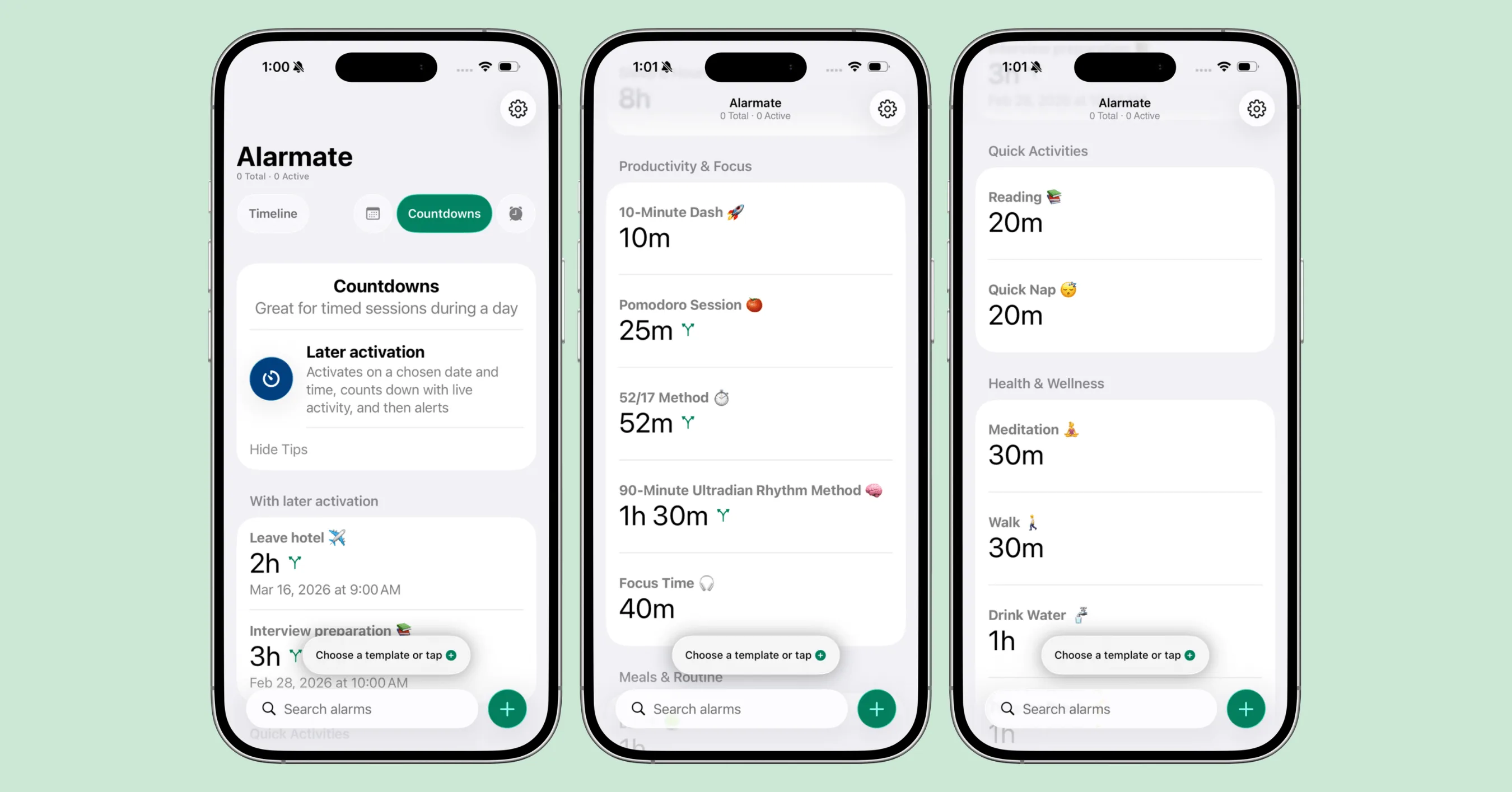
Timers in Alarmate
Alarms, Reimagined
We repurposed alarms into a true productivity tool.
They’re no longer just for waking up.
They’re for everything you don’t want to ignore - from meetings and deadlines to habits and personal commitments.
We also spent a lot of time making sure alarms are truly reliable:
- They work in Focus, Do Not Disturb, Airplane and Sleep modes
- They don’t rely on the app being constantly open
- They’re designed to be battery-efficient
Unlike many alarm and reminder apps that rely on fragile notifications, Alarmate is built to deliver real alarms that consistently break through when it matters.
That reliability is foundational to everything we built - because a productivity tool that fails once quickly becomes one you stop trusting.
So Why Try Alarmate?
Yes - you can use the default alarm app or calendar notifications. (And yes, Alarmate now works with Siri too, for the times a quick tap isn’t enough.)
But if you:
- Are late to meetings despite reminders and need a better way to turn reminders into real alarms
- Check your calendar obsessively
- Struggle with notification blindness
- Want fewer mental interruptions
- Ignore standard notifications for healthy habits (like water, breaks, or pill reminders)
Then Alarmate might change how you manage time.
You might ask: “Why should I pay for another alarm app? I can set a default iOS alarm, use Siri, or rely on calendar reminders, and be fine.”
We understand.
While we treat Alarmate as a productivity tool, we know you need to try it to believe it.
That’s why we decided to offer all functionality for free, with no ads.
Yes - you read that right.
You can use Alarmate for free.
The only limit is 3 active alarms at a time. Once one is turned off, you can activate another.
Sounds crazy? We believe that only users who fully use the app and see its value should pay for it. If you’re lucky enough not to have many meetings in a day, 3 active alarms should be more than enough.
We’d appreciate your feedback, feature requests, and if you share it with anyone who might need it.
Contact usRead Also: