Alarmate isn’t just for waking up - it’s built for staying reliably on schedule all day.
It works just like the default iPhone Clock app you already trust, but gives you more control, flexibility, and insight into your time. Unlike the built-in Clock app, Alarmate lets you turn your iPhone calendar events into reliable alarms.
If you’re deciding what should replace or complement the built-in Clock app, read our full guide to the best alarm clock app for iPhone.
With Alarmate, you can:
- Use alarms to manage your time and get notified about everything you don’t want to miss - from client meetings and doctor appointments to flights, reminders to drink water, calling Mom, or weekly cleaning.
- Rely on every alarm - they’ll ring even if your phone is muted, in Focus, or offline.
- Eliminate constant calendar checks and free your mind to focus on work.
- Stay confident that you’ll never miss what matters - meetings, flights, or deadlines.
- Feel calmer and more organized, knowing your alerts will always break through.
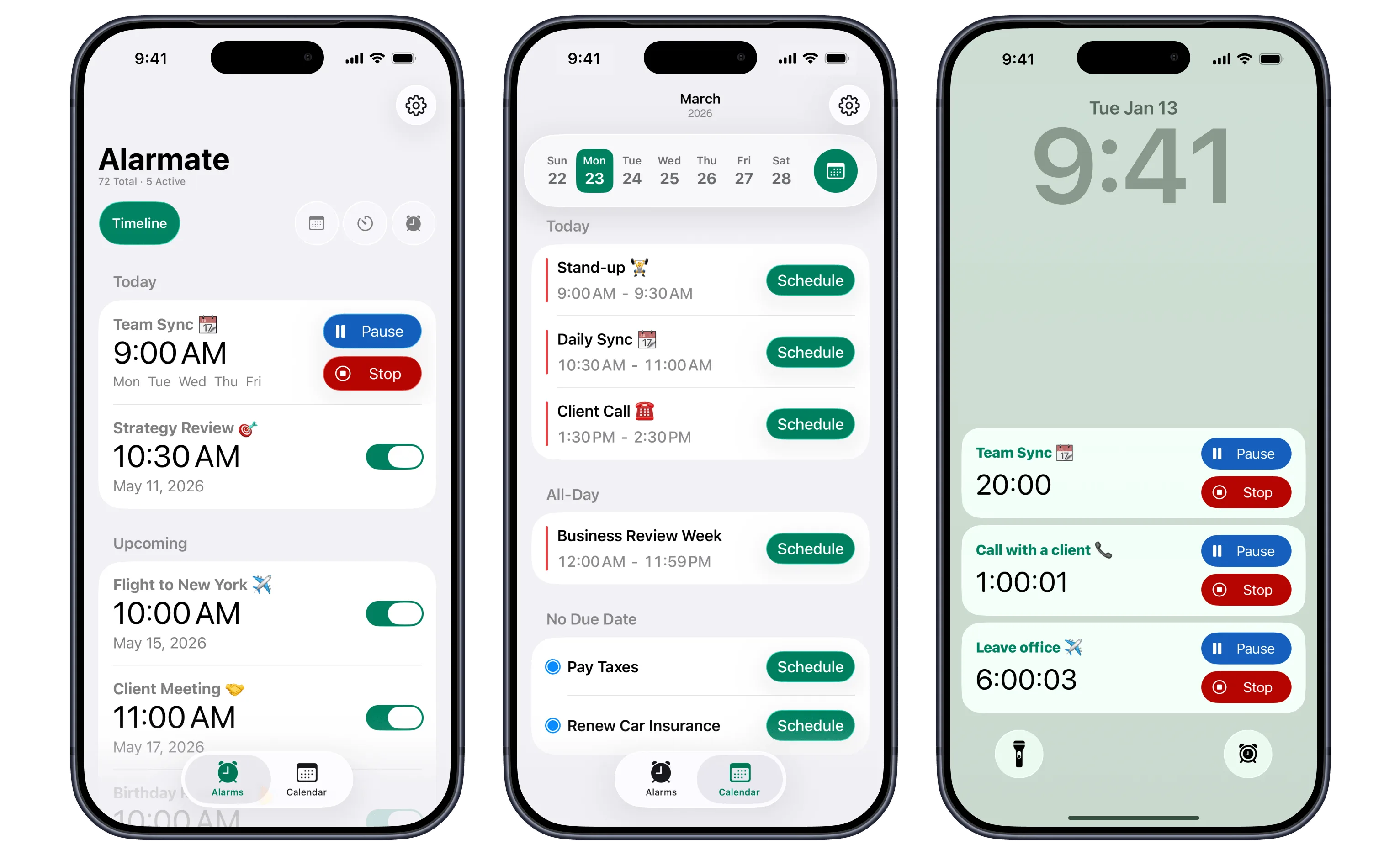
Alarmate features (left to right): Upcoming alarms timeline, calendar-based alarms, Live Activities
Key differences
| Feature | iOS Clock App | Alarmate |
|---|---|---|
| Snooze duration | 1-15 minutes | 1 second-24 hours |
| One-time alarms for today | ✅ | ✅ |
| Recurring alarms | ✅ | ✅ |
| Date-based alarms (future dates) | ❌ | ✅ |
| Calendar-based alarms | ❌ | ✅ |
| Reminder-based alarms | ❌ | ✅ |
| Timers with delayed activation | ❌ | ✅ |
| Live Activity countdowns | ❌ | ✅ |
| Dynamic Island support | ❌ | ✅ |
| Stop a recurring alarm without disabling it | ❌ | ✅ |
| Alarm search | ❌ | ✅ |
| Timeline view of all alarms | ❌ | ✅ |
| Filters by alarm type | ❌ | ✅ |
| Siri alarms for future dates | ❌ | ✅ |
| Built for AI-powered Siri (natural-language requests) | ✅(next 24 hours only) | ✅ |
| Works with Siri Shortcuts & automations | ✅(next 24 hours only) | ✅ |
| Set alarms by voice with Siri | ✅(next 24 hours only) | ✅ |
| Works in Silent / Focus / Airplane mode | ✅ | ✅ |
| Battery-efficient, system-level alarms | ✅ | ✅ |
More alarm types:
Alarmate gives you multiple ways to stay on time and in control, whether for work, study, or everyday life.
- Date-based alarms for deadlines, birthdays, or events.
- Calendar event alarms so you won’t miss any important meeting.
- Timers for quick tasks, naps, or focus sessions. You can create timers with a later activation date and time, for example, if you want to see how much time is left until your train next Sunday, and only start seeing the Lock Screen countdown two hours before departure.
- Reminder alarms for things you don’t want to forget.
- Familiar iPhone-style alarms with a smarter twist. Enjoy the simplicity you already know, plus advanced features like Live Activity countdowns so you can see exactly when the next alarm is coming and stop it early if needed.
Alarmate adapts to how you plan your day - giving you a single, reliable system for every kind of alert.
Why Alarmate Does More Than Your Default Alarm
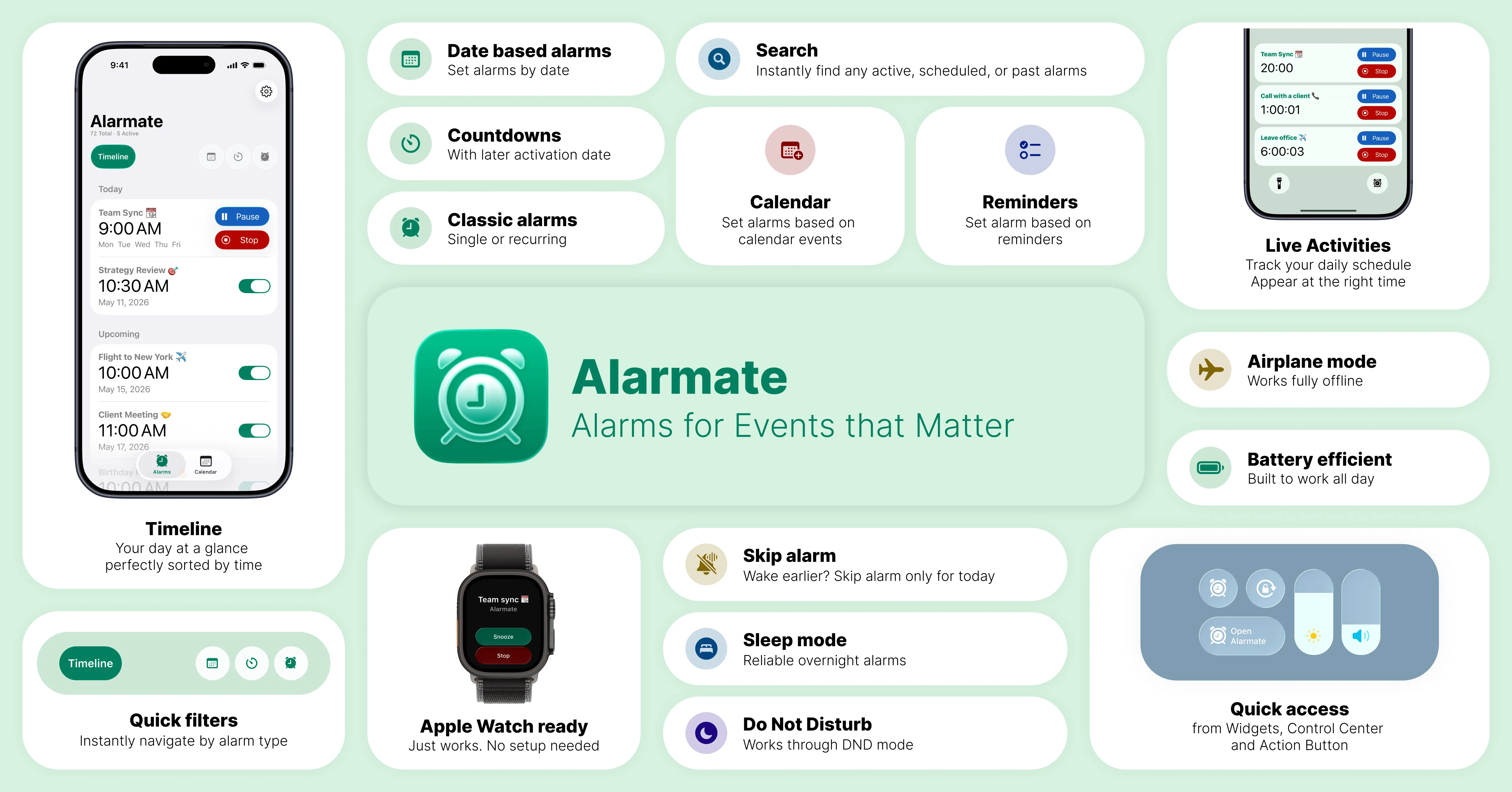
Alarmate: key features at a glance. View all Alarmate features ➔
Alarmate is built to do what default alarms can’t: give you reliable, persistent, and context-aware alerts for your meetings, tasks, and routines.
With Live Activity and deep app integrations, you’ll always see what’s next and stay in control - without constantly checking calendars or reminders.
-
View your next alert with Live Activity or Dynamic Island countdowns. Customize when countdowns appear - for example, see a meeting reminder 15 minutes before it starts, or track a flight two hours before departure.
-
Connect your calendar (including syncing your work email) and Reminders app to turn them into alarms. With one click on any event or reminder, you get an alarm with a descriptive name - plus you can customize Live Activities fire time and snooze duration. If reminders are the main use case, start with this guide to turn Apple Reminders into alarms.
-
Set alarms to ring with sound or vibration only. Use silent alarms in meetings, at work, or anytime you don’t want to disturb others. They still ring until you stop them - just without sound.
-
View all alarms sorted by date and time. Use alarm search to quickly find what you need. Group alarms by type, active or inactive, for easier navigation.
When you manage multiple alarms, the default alarm clock becomes hard to use. It sorts alarms only by time and mixes active and inactive ones, making it harder to stay organized.
Example uses
Alarmate goes beyond basic one-time and recurring alarms, giving you a smarter, dependable way to stay on top of meetings, deadlines, and daily routines.
Use it for anything you want to stay on track with: meetings, deadlines, study sessions, travel, focus routines, cooking timers, or even reminders to drink water - Alarmate keeps every important task on your radar.

Wake up in 2 hours.
Remind me to check the oven in 20 minutes.
Alert me 5 minutes before a meeting.
Set a birthday alarm.
Remind me to take medication.
Start a 1-hour focus session.
Set alarms for all events today.
Alert me to pay my electricity bill on [specific date] at [time].
Alert me to check in for my flight on [specific date] at [time].
Start a Pomodoro session, e.g., 25-minute focused work blocks.
Drink water in 2 hours.
Start a 30-minute workout.
Take a daily break at 3 PM - protect your energy and focus.
Pick up kids from school at 4 PM.
Begin a 2-hour deep work block starting at 9 AM.
Read Also: Date Alarms on iPhone: The Complete Guide to Alarmate and Alarm Templates are here: set alarms & timers in seconds
What’s the Same Between Alarmate and the iOS Clock App
Even though Alarmate adds new ways to set and manage alarms, it’s built on the same iOS technologies that power Apple’s Clock app.
Both share a few key strengths that make them reliable and efficient parts of the iPhone experience.
They’re battery-efficient, work seamlessly in Focus, Do Not Disturb, and Sleep modes.
Both integrate deeply with iOS, so you can add them to your Control Center, widgets, or StandBy mode for quick access.
In short, Alarmate expands on the familiar Clock foundation without sacrificing the stability and performance iPhone users already trust.
Setting Alarms with Siri: Clock App vs Alarmate
Both Alarmate and the Clock app work with Siri, Siri Shortcuts, and the new AI-powered Siri. The difference is how far each one lets you go.
Ask Siri to “set an alarm for 7 AM” and the Clock app handles it beautifully. The same is true in Shortcuts and automations, where you can build an alarm into a morning routine. But every one of these paths runs into the same wall: the Clock app can’t set an alarm more than 24 hours ahead. So the moment you say “set an alarm in 3 weeks” or “remind me on the 14th,” Siri has nowhere to put it, and you are back to doing it by hand closer to the day.
Alarmate removes that ceiling. It gives Siri direct access to its own alarm creation, so your voice can finally set the alarms that matter beyond today and tomorrow:
- Date alarms for any future day, weeks or months out
- Recurring alarms for the things that repeat
- Timers, started now or scheduled to start later
Date math that actually sticks
Alarmate makes the math stick. Say “30 minutes before 4:30 PM” and Alarmate turns that into a 4:00 PM alarm. The difference is what happens when the answer lands far out. Tell Siri “in 3 weeks” or “2 weeks before the 14th” and the Clock app has nowhere to keep it, because it can’t hold an alarm more than 24 hours ahead. Alarmate can, so the requested alarm actually gets set, days, weeks, or months out. No counting days on a calendar, no doing it by hand later.
There is one habit that makes this reliable: start your request with “Alarmate,” for example “Alarmate, set a date alarm.” That tells Siri which app to use. You will know it worked when Siri’s question appears with ”⏰ Alarmate” in front of it, like ”⏰ Alarmate: When should the alarm go off?” If you don’t see it, Siri reached for the default Clock app, so just start again with “Alarmate” at the front.
For the step-by-step voice setup, supported alarm types, and example phrases, see the full Siri set alarm guide. If you use Apple Reminders, we also have a guide to creating reminders with Siri in iOS 27 and making sure the important ones actually ring.
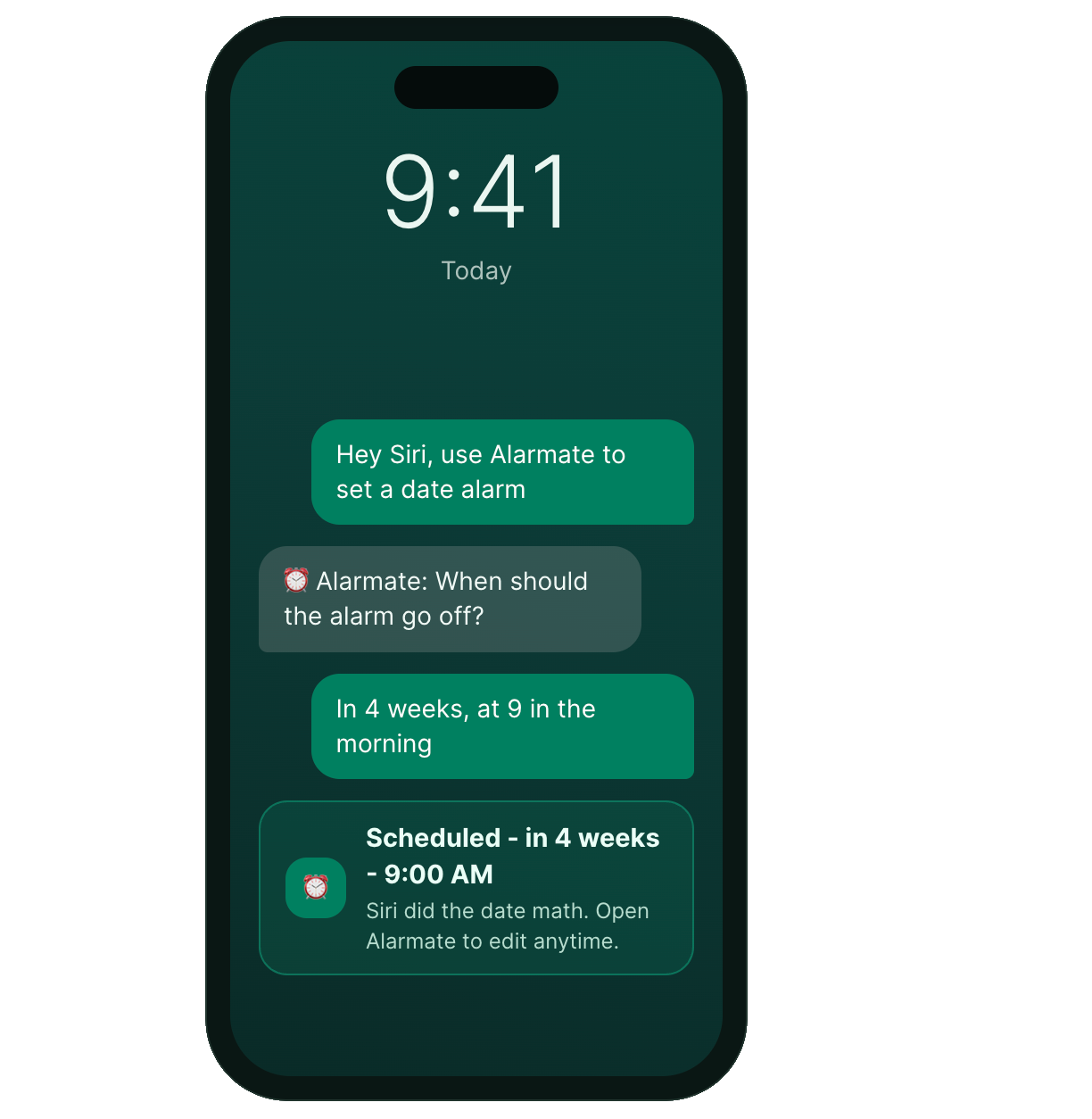
Ready for Shortcuts and the smarter Siri
You can also drop Alarmate into Siri Shortcuts and automations, so creating an alarm becomes one step in a bigger workflow, like a travel routine or the start of your workday. And with the smarter, AI-powered Siri rolling out in iOS 27, speaking your plans is about to feel even more natural. Alarmate is built for exactly that, so the same simple request keeps working as Siri gets better at understanding you.
Alarmate helps you focus on the present by trusting your future is handled. When the moment comes, your alarm will ring - no matter what.
For power users managing complex schedules, Alarmate Pro provides unlimited active alarms and timers.
And the best part, you can use it for free!
Read Also: